Lianja System Object Methods
Contents
- 1 See Also
- 2 Methods by Category
- 2.1 AI and Markdown
- 2.2 App Builder
- 2.3 Commands and Scripts
- 2.4 Data Sessions
- 2.5 Dialogs and Panels
- 2.6 Email
- 2.7 Environment and State
- 2.8 HTTP Server (Internal)
- 2.9 Messages
- 2.10 Object Referencing
- 2.11 Page Element Display
- 2.12 Query Tools
- 2.13 Reports and Printing
- 2.14 SQL
- 2.15 Standalone Apps
- 2.16 Text Output
- 2.17 Translation
- 2.18 UI States
- 2.19 Uploading
- 2.20 Virtual Tables
- 3 Methods Alphabetically
- 3.1 addObject
- 3.2 addPage
- 3.3 addProperty
- 3.4 addTool
- 3.5 alert
- 3.6 applyMetaData
- 3.7 askAI
- 3.8 beep
- 3.9 changeState
- 3.10 clearNamedParameters
- 3.11 clipBoard
- 3.12 closeApp
- 3.13 confirm
- 3.14 connect
- 3.15 createApp
- 3.16 createCursor
- 3.17 debug
- 3.18 deployAppIcon
- 3.19 emailReport
- 3.20 evaluate
- 3.21 evaluateAsync
- 3.22 evaluateJavaScript
- 3.23 evaluatePython
- 3.24 execAgent
- 3.25 execute
- 3.26 exportReport
- 3.27 fileToText
- 3.28 findElementByID
- 3.29 fullPath
- 3.30 generateAppDoc
- 3.31 generateDbDoc
- 3.32 get
- 3.33 getAppCategories
- 3.34 getAppInfo
- 3.35 getAttr
- 3.36 getAudio
- 3.37 getConnection
- 3.38 getControlsource
- 3.39 getCursor
- 3.40 getCurrentAcceleration
- 3.41 getCurrentLocation
- 3.42 getCurrentPosition
- 3.43 getData
- 3.44 getDialogResult
- 3.45 getElementByControlsource
- 3.46 getElementByID
- 3.47 getFiles
- 3.48 getOrientation
- 3.49 getParameter
- 3.50 getPhoto
- 3.51 getPicture
- 3.52 getURL
- 3.53 getVideo
- 3.54 hideDialog
- 3.55 hideDialogPage
- 3.56 hideDialogPanel
- 3.57 hideLoadingMessage
- 3.58 hideMessage
- 3.59 hideNavigationPanel
- 3.60 hideProgressBar
- 3.61 home
- 3.62 isConnected
- 3.63 isDesktop
- 3.64 isDevMode
- 3.65 isLoadingApp
- 3.66 isKisoskMode
- 3.67 isPhone
- 3.68 isPhoneGap
- 3.69 isRuntimeMode
- 3.70 isTablet
- 3.71 item
- 3.72 listAgents
- 3.73 loadAddIns
- 3.74 loadLibrary
- 3.75 loadReport
- 3.76 locale
- 3.77 log
- 3.78 logEvent
- 3.79 login
- 3.80 logout
- 3.81 makePayment
- 3.82 markdownToHTML
- 3.83 markdownToHTMLFromFile
- 3.84 openApp
- 3.85 openDatabase
- 3.86 pauseHttpServer
- 3.87 popDataSession
- 3.88 popState
- 3.89 previewReport
- 3.90 printFile
- 3.91 printHtml
- 3.92 printHtmlFile
- 3.93 printReport
- 3.94 pushDataSession
- 3.95 refreshAppInspector
- 3.96 removeObject
- 3.97 removePage
- 3.98 removeProperty
- 3.99 removeTool
- 3.100 resetState
- 3.101 resume
- 3.102 resumeHttpServer
- 3.103 run
- 3.104 runtimeCaption
- 3.105 saveApp
- 3.106 saveReportAsPdf
- 3.107 selectWorkspace
- 3.108 sendmail
- 3.109 setAttr
- 3.110 setData
- 3.111 setDialogResult
- 3.112 setFocusInSearchBox
- 3.113 setNamedParameter
- 3.114 setRelationship
- 3.115 setTranslationText
- 3.116 setupUI
- 3.117 showAppWizard
- 3.118 showDialog
- 3.119 showDialogForm
- 3.120 showDialogPage
- 3.121 showDialogPanel
- 3.122 showDocument
- 3.123 showErrorMessage
- 3.124 showErrorMessageWithIcon
- 3.125 showForm
- 3.126 showHelp
- 3.127 showLoadingMessage
- 3.128 showMessage
- 3.129 showMessageWithIcon
- 3.130 showMoverDialog
- 3.131 showNavigationPanel
- 3.132 showNotification
- 3.133 showPagesMenu
- 3.134 showPickList
- 3.135 showProgressBar
- 3.136 showQueryBuilder
- 3.137 showQueryBuilderPanel
- 3.138 showQueryPicker
- 3.139 showQueryPickerPanel
- 3.140 showReportViewer
- 3.141 showSuccessMessage
- 3.142 showSuccessMessageWithIcon
- 3.143 showWarningMessage
- 3.144 showWarningMessageWithIcon
- 3.145 spawn
- 3.146 spawnApp
- 3.147 sqlExec
- 3.148 startHttpServer
- 3.149 stopHttpServer
- 3.150 suspend
- 3.151 switchDatabase
- 3.152 switchLanguage
- 3.153 toggleLeftSidebarVisibility
- 3.154 toggleNavigationPanel
- 3.155 toggleRightSidebarVisibility
- 3.156 translateText
- 3.157 unwatchFile
- 3.158 uploadFile
- 3.159 uploadImageFiles
- 3.160 userDomain
- 3.161 userName
- 3.162 userRoles
- 3.163 version
- 3.164 vibrate
- 3.165 watchFile
- 3.166 writeDebug
- 3.167 writeError
- 3.168 writeLog
- 3.169 writeOutput
See Also
Lianja System Object Properties
Methods by Category
Selected methods by category. For a complete list of methods, see Methods Alphabetically.
AI and Markdown
| Method | Description |
|---|---|
| askAI | Programmatically chat with OpenAI. |
| execAgent | Run an AI agent. |
| fileToText | Return the contents of a file as text. |
| listAgents | List available AI agents. |
| markdownToHTML | Convert Markdown text to HTML. |
| markdownToHTMLFromFile | Convert Markdown text from a file to HTML. |
App Builder
| Method | Description |
|---|---|
| createApp | Create the specified App. |
| generateAppDoc | Generate App Doc for the current App. |
| generateDbDoc | Generate Database Doc for the current App's currently open database. |
| refreshAppInspector | Refresh the attributes in the App Inspector and the Page Builder Assistant. |
| selectWorkspace | Select the specified Workspace. |
| setRelationship | Relate two sections. |
| showAppWizard | Display the App Wizard. |
Commands and Scripts
| Method | Description |
|---|---|
| evaluate | Evaluate expression. |
| evaluateAsync | Evaluate expression asynchronously. |
| evaluateJavaScript | Call server-side JavaScript function and return any result. |
| evaluatePython | Call server-side Python function and return any result. |
| execute | Execute command. |
| run | Run the specified executable. |
| setupUI | Execute setupui.prg. |
| spawn | Run the specified executable. |
Data Sessions
| Method | Description |
|---|---|
| popDataSession | Restore the current data session. |
| pushDataSession | Save the current data session. |
Dialogs and Panels
Also see: Working with UI Page Libraries
| Method | Description |
|---|---|
| hideDialog | Hide the current dialog. |
| hideDialogPage | Hide the most recent dialog page. |
| hideDialogPanel | Hide the current dialog panel. |
| setDialogResult | Set the result for a dialog or dialog panel. |
| showDialog | Pop up a dialog with an embedded page. |
| showDialogForm | Pop up a dialog with an embedded form. |
| showDialogPage | Pop up a dialog with an embedded page over the whole page viewport. |
| showDialogPanel | Slide in a dialog panel with an embedded page. |
| Method | Description |
|---|---|
| emailReport | Email the specified report. |
| sendmail | Send an email with optional attachment(s). |
Environment and State
| Method | Description |
|---|---|
| isConnected | Return logical true if connected, false otherwise. |
| isDesktop | Return logical true if on desktop (App Builder or App Center desktop client), false otherwise. |
| isDevMode | Return logical true if on desktop (App Builder or App Center desktop client), false otherwise. |
| isLoadingApp | Return logical true if loading App, false otherwise. |
| isKioskMode | Return logical true if in kiosk mode, false otherwise. |
| isPhone | Return logical true if client is phone mobile device, false otherwise. |
| isPhoneGap | Return logical true if client is mobile device, false otherwise. |
| isRuntimeMode | Return logical true if in runtime mode, false otherwise. |
| isTablet | Return logical true if client is tablet mobile device, false otherwise. |
| locale | Return the current locale. |
| runtimeCaption | Return the runtime caption. |
| userDomain | Return the domain/tenancy for the current user. |
| userName | Return the username for the current user. |
| userRoles | Return the roles for the current user. |
| version | Return the current Lianja version (HTML formatted). |
HTTP Server (Internal)
| Method | Description |
|---|---|
| pauseHttpServer | Pause the internal HTTP server. |
| resumeHttpServer | Resume the internal HTTP server. |
| startHttpServer | Start the internal HTTP server. |
| stopHttpServer | Stop the internal HTTP server. |
Messages
| Method | Description |
|---|---|
| alert | Show the specified alert message. |
| confirm | Show the specified message and pass the result (true|false) to the specified callback function. |
| hideLoadingMessage | Hide the current loading message. |
| hideMessage | Hide the current message. |
| showErrorMessage | Show the specified error message. |
| showErrorMessageWithIcon | Show the specified error message. |
| showLoadingMessage | Show the specified loading message. |
| showMessage | Show the specified message. |
| showMessageWithIcon | Show the specified message. |
| showNotification | Show the specified notification message. |
| showSuccessMessage | Show the specified success message. |
| showSuccessMessageWithIcon | Show the specified success message. |
| showWarningMessage | Show the specified warning message. |
| showWarningMessageWithIcon | Show the specified warning message. |
Object Referencing
| Method | Description |
|---|---|
| connect | Open the specified database if not already open and return a Database object reference. |
| createCursor | Return a reference to a Cursor object. |
| findElementByID | Return a reference to the object with the specified id. |
| get | Return a reference to the object with the specified id. |
| getControlsource | Return a reference to the formitem with the specified controlsource. |
| getElementByControlsource | Return a reference to the formitem with the specified controlsource. |
| getElementByID | Return a reference to the object with the specified id. |
| item | Return a reference to the Page object at the specified position. |
| openDatabase | Open the specified database and return a Database object reference. |
Page Element Display
| Method | Description |
|---|---|
| hideNavigationPanel | Hide the Navigation Panel. |
| hideProgressBar | Hide the ProgressBar. |
| showNavigationPanel | Show the Navigation Panel. |
| showPagesMenu | Show the Pages Menu. |
| toggleLeftSidebarVisibility | Toggle left sidebar visibility. |
| toggleNavigationPanel | Toggle Navigation Panel visibility. |
| showProgressBar | Show the ProgressBar. |
| toggleRightSidebarVisibility | Toggle right sidebar visibility. |
Query Tools
| Method | Description |
|---|---|
| showQueryBuilder | Embed the Query Builder in a standard dialog. |
| showQueryBuilderPanel | Embed the Query Builder in a dialogPanel. |
| showQueryPicker | Embed the Query Picker in a standard dialog. |
| showQueryPickerPanel | Embed the Query Picker in a dialogPanel. |
Reports and Printing
Also see this blog article: Working with reports in Lianja 9.4
| Method | Description |
|---|---|
| emailReport | Email the specified report. |
| exportReport | Export the specified report to a file of a specified type. |
| loadReport | Load the specified report into a specified section. |
| previewReport | Open the specified report in print preview. |
| printFile | Print the specified file to a printer destination. |
| printHtml | Print the specified HTML. |
| printHtmlFile | Print the specified HTML file. |
| printReport | Print the specified report. |
| saveReportAsPdf | Save the specified report to a PDF, optionally specifying a filter. |
| showReportViewer | Show the specified report in the report viewer. |
SQL
| Method | Description |
|---|---|
| sqlExec | Executes a SQL statement, returning either an array of record objects (SQL SELECT) or the number of rows affected (non Select statements, e.g. SQL INSERT). |
Standalone Apps
Also see: Standalone Executables on Windows
| Method | Description |
|---|---|
| debug | Open the Standalone Debugger when running a Windows standalone App. From v9.5. |
| getParameter | Get the value of a key. If the key is not defined, return a default value. Key/value pairs can be defined in the app.conf file for Windows standalone Apps. From v9.5. |
| resume | Resume previously suspended execution when debugging a Windows standalone App. From v9.5. |
| suspend | Suspend execution when debugging a Windows standalone App. From v9.5. |
Text Output
| Method | Description |
|---|---|
| console | Write the specified string to the console output window. |
| log | Write the specified string to the log. |
| logEvent | Write the specified string to the Performance Metrics tab in the Troubleshooter. |
| writeDebug | Write the specified string to the debug file. |
| writeError | Write the specified string to the console. |
| writeLog | Write the specified string to the log (desktop) or JavaScript Console (web/mobile). |
| writeOutput | Write the specified string to the Output Window (desktop) or JavaScript Console (web/mobile). |
Translation
| Method | Description |
|---|---|
| setTranslationText | Override default translation. |
| switchLanguage | Switch to the language code specified. |
UI States
| Method | Description |
|---|---|
| changeState | Set the specified UI state(s). |
| popState | Call Lianja.resetState() on the last UI state pushed onto the stack then remove it and call Lianja.changeState() on the UI state on the top of the stack. |
| resetState | Set the UI state(s) if specified, or set all UI components to their Initial UI State. |
Uploading
| Method | Description |
|---|---|
| uploadFile | Upload a file. |
| uploadImageFiles | Upload one or more image files. |
Virtual Tables
| Method | Description |
|---|---|
| clearNamedParameters | Clear all named parameters. |
| setNamedParameter | Set the specified named parameter to the specified value. |
Methods Alphabetically
- Key
| Supported on this client. Note that for the web/mobile client, this applies to client-side code. The Lianja system object is not available in server-side functions and procedures. | |
| Supported in Lianja/VFP scripting only on this client. | |
| Not currently supported on this client. |
The Lianja System Object class supports the following methods:
addObject
| Desktop | Web | Mobile |
- Args
existing as Object | newobject as Character, class as Character [, caption as Character]
- Description
Add an existing object or a new object, in which case the object's class must also be specified and optionally its caption.
addPage
| Desktop | Web | Mobile |
- Args
id as Character, caption as Character
- Description
Add a new Page with the specified id and caption.
addProperty
| Desktop | Web | Mobile |
- Args
property as Character, value as Expression
- Description
Add a property and set its value.
addTool
| Desktop | Web | Mobile |
- Args
class as Character, caption as Character
- Description
Add a tool
alert
| Desktop | Web | Mobile |
- Args
message as Character
- Description
Show the specified message.
applyMetaData
| Desktop | Web | Mobile |
- Args
None
- Description
Apply MetaData to all pages in the current App.
askAI
| Desktop | Web | Mobile |
- Args
aipromt as Character [, outputfile as Character, aicontext as Character, attachmentfile as Character]
- Description
Programmatically chat with OpenAI. The result can optionally be saved in the outputfile.
If the prompt contains {attachment} the attachmentfile is read and inserted into the prompt, e.g. 'analyse this excel file: {attachment}'.
The aicontext can be 'pages' or 'data'.
Ater calling askAI() you would typically append html into a Webview. AI providers return text in markdown format so use Lianja.markdownToHTML() to convert it to HTML.
htmltext = Lianja.markdownToHTML(markdowntext)

text = Lianja.fileToText(cFilename) // xlsx, docx, pdf, txt, csv
From v11.0.
beep
| Desktop | Web | Mobile |
- Args
None
- Description
Sound a 'beep'.
changeState
| Desktop | Web | Mobile |
- Args
statelist as Character
- Description
Set the UI state(s) specified in the comma-separated string statelist. From v9.1.
See also UI States.
clearNamedParameters
| Desktop | Web | Mobile |
- Args
None
- Description
Clear all named parameters previously set using setNamedParameter(name,value).
clipBoard
| Desktop | Web | Mobile |
- Args
[clipping as Character]
- Description
Read from or write to the system clipboard.
closeApp
| Desktop | Web | Mobile |
- Args
None
- Description
Close the currently open App.
confirm
| Desktop | Web | Mobile |
- Args
message as Character, callback as Function
- Description
Show the specified message and pass the result (true|false) to the callback function.
connect
| Desktop | Web | Mobile |
- Args
database as Character
- Description
Open the specified database if not already open and return a Database object reference.
Note: reference.close() does not close the database when the reference is created using Lianja.connect() and the database was already open.
From v11.0.
createApp
| Desktop | Web | Mobile |
- Args
app as Character
- Description
Create the specified App.
createCursor
| Desktop | Web | Mobile |
- Args
database as Character, table as Character
- Description
Return a reference to a Cursor object for the specified table from the specified database.
debug
| Desktop | Web | Mobile |
- Args
None
- Description
Open the Standalone Debugger when running a Windows standalone App. From v9.5.
deployAppIcon
| Desktop | Web | Mobile |
- Args
app as Character, filename as Character [, pagecenter as Logical]
- Description
Deploy image file for App or Page Center.
emailReport
| Desktop | Web | Mobile |
- Args
reportname as Character, filter as Character, emailto as Character, emailfrom as Character, subject as Character, body as Character
- Description
Email the specified report as an attachment. From v9.4.
| Argument | Description |
|---|---|
| reportname | One of the following:
|
| filter | A where condition, e.g.
"orderid=10428" |
| emailto | The recipient identity in the format:<Full Name>email@domaine.g. "<Lianja Sales>[email protected]"Note there is no space between '>' and the email address. If the '<Full Name>' is not specified, '<Lianja Cloud User>' is used. |
| emailfrom | The sender identity in the format:<Full Name>email@domaine.g. "<Lianja Sales>[email protected]"Note there is no space between '>' and the email address. If the '<Full Name>' is not specified, '<{username()}>' is used. |
| subject | The email subject. |
| body | The email body in plain text or HTML. |
The email can optionally be sent using Twilio SendGrid.
To do so, the following are required:
- Signup for SendGrid at sendgrid.com
- Set up the following environment variables:
| Environment Variable | Required | Value |
|---|---|---|
| SENDGRID_APIKEY | Yes | Your SendGrid API KEY. |
| SENDGRID_SENDERIDENTITY | No | Your SendGrid verified sender identity in the format:<Full Name>email@domaine.g. "<Lianja Sales>[email protected]"Note there is no space between '>' and the email address. If this environment variable is not set, the email from '<Full Name>' is '<{username()}>' and your registered SendGrid email address. |
| SENDGRID_REPLYTO | No | The reply to address for emails. If this environment variable is not set, '[email protected]' is used. |
| SENDGRID_REPLYTONAME | No | The '<Full Name>' for the reply to address for emails. |
evaluate
| Desktop | Web | Mobile |
- Args
expression as Character [, onsuccess as Function [, onerror as Function]]
- Description
Evaluate expression. In the LianjaWebFramework, business procedures in custom libraries on the server can also be called. To call a procedure in a library, prefix the procedure name with the library name and '::'
var result = Lianja.evaluate("mylib::myproc()");
The expression can include a scripting language prefix to indicate the target language, i.e. 'javascript:', 'php:', 'python:'. If none is specified, Lianja/VFP scripting is used.
evaluateAsync
| Desktop | Web | Mobile |
- Args
expression as Character [, onsuccess as Function [, onerror as Function]]
- Description
Evaluate expression asynchronously. In the LianjaWebFramework, business procedures in custom libraries on the server can also be called. To call a procedure in a library, prefix the procedure name with the library name and '::'
var result = Lianja.evaluate("mylib::myproc()");
The expression can include a scripting language prefix to indicate the target language, i.e. 'javascript:', 'php:', 'python:'. If none is specified, Lianja/VFP scripting is used.
evaluateJavaScript
| Desktop | Web | Mobile |
- Args
functioncall as Character
- Description
Call server-side JavaScript function and return any result.
evaluatePython
| Desktop | Web | Mobile |
- Args
functioncall as Character
- Description
Call server-side Python function and return any result.
execAgent
| Desktop | Web | Mobile |
- Args
URL as Character, APIkey as Character, agentName as Character, arguments as Character
- Description
Execute the specified AI agent.
- URL e.g. "localhost:8001"
- APIkey the APIKEY for the target Cloud Server (Lianja Server Manager on Windows, Lianja Server Manager on Linux).
- agentName the name of the agent to execute
- arguments: a comma separated list of arguments for the agent from its "input_schema" (Lianja.listAgents()) e.g. "location=london"
- Returns the result as a a JSON string. Use JSON_DECODE() to decode it into an object.
- Agents can be deployed to a cloud server from the AI Agents Workspace or by creating a package of agents in the and installing it using the Lianja Admin Console.
- Note that Lianja.execAgent() can also be used in Web/Mobile Apps to call agents on the server. The URL is ignored in Web Apps. It always calls agents on the server the App is loaded from.
- From v11.0.
execute
| Desktop | Web | Mobile |
- Args
command as Character
- Description
Execute the specified command.
exportReport
| Desktop | Web | Mobile |
- Args
reportname as Character, exporttype as Character, outputfilename as Character, filter as Character
- Description
Export the specified report. From v9.4.
| Argument | Description |
|---|---|
| reportname | The name of a report created in the Report Builder. |
| exporttype | The export file type:
|
| outputfilename | The name of the output file. |
| filter | A where condition, e.g.
"orderid=10428" |
fileToText
| Desktop | Web | Mobile |
- Args
filename as Character
- Description
Return a textual representation of any pdf, xlsx, docx, txt or csv file. From v11.0.
findElementByID
| Desktop | Web | Mobile |
- Args
id as Character
- Description
Return a reference to the object with the specified id. See Working with the Lianja Object Model for more details.
fullPath
| Desktop | Web | Mobile |
- Args
filename as Character
- Description
Return the specified file's full path as a character string. The filename can be prefixed with known locations and will be translated i.e. app:/, lib:/, page lib:/, extensions:/, packages:/, data:/, themes:/, metatypes:/, cloudserver:/, wwwroot:/, images:/.
generateAppDoc
| Desktop | Web | Mobile |
- Args
filename as Character
- Description
Generate App Doc for the current App. The file will be created in the current directory with a '.html' extension if no path or extension is specified.
generateDbDoc
| Desktop | Web | Mobile |
- Args
filename as Character
- Description
Generate Database Doc for the current App's currently open database. The file will be created in the current directory with a '.html' extension if no path or extension is specified.
get
| Desktop | Web | Mobile |
- Args
id as Character
- Description
Return a reference to the object with the specified id. See Working with the Lianja Object Model for more details.
getAppCategories
| Desktop | Web | Mobile |
- Args
None
- Description
Return a JSON string of App Categories and the Apps in those Categories.
getAppInfo
| Desktop | Web | Mobile |
- Args
appname as Character [, category as Character]
- Description
Return a JSON string of information about the specified published App. The App category, tab name or full category can optionally be specified, e.g.
? Lianja.getAppinfo("lianjacustomcanvas")
? Lianja.getAppinfo("lianjacustomcanvas","Demo Desktop Apps")
? Lianja.getAppinfo("lianjacustomcanvas","Examples")
? Lianja.getAppinfo("lianjacustomcanvas","Examples|Demo Desktop Apps")
The following App Center Tile information is returned:
- category
- name
- caption
- description
- icon
- size
- backcolor
- author
- version
- dynamic
- timerinterval
- timeraction
- dynamiccounter
- countertimerinterval
- countertimeraction
getAttr
| Desktop | Web | Mobile |
- Args
name as Character
- Description
Returns the value of the named App setting. See also Custom Builders.
getAudio
| Desktop | Web | Mobile |
- Args
- Description
See Developing PWA Apps.
getConnection
| Desktop | Web | Mobile |
- Args
None
- Description
Return the connection type, e.g. 'WiFi connection'.
getControlsource
| Desktop | Web | Mobile |
- Args
controlsource as Character
- Description
Return a reference to the formitem bound to the specified controlsource. See Working with the Lianja Object Model for more details.
getCursor
| Desktop | Web | Mobile |
- Args
alias as Character
- Description
Return a reference to a Cursor object for the specified table alias.
getCurrentAcceleration
| Desktop | Web | Mobile |
- Args
onSuccess as Function, onError as Function
- Description
Return the current acceleration along the x, y, and z axes as an object.
getCurrentLocation
getCurrentPosition
| Desktop | Web | Mobile |
- Args
onSuccess as Function, onError as Function
- Description
Return the current position as a position object.
getData
| Desktop | Web | Mobile |
- Args
controlsource as Character
- Description
Return the current value of the specified data controlsource.
getDialogResult
| Desktop | Web | Mobile |
- Args
None
- Description
Works in conjunction with the Lianja.setDialogResult() method to return the set value. It can also be used to return the result of the Lianja.showMoverDialog() method on the desktop.
getElementByControlsource
| Desktop | Web | Mobile |
- Args
controlsource as Character
- Description
Return a reference to the formitem bound to the specified controlsource. See Working with the Lianja Object Model for more details.
getElementByID
| Desktop | Web | Mobile |
- Args
id as Character
- Description
Return a reference to the object with the specified id. See Working with the Lianja Object Model for more details.
getFiles
| Desktop | Web | Mobile |
getOrientation
| Desktop | Web | Mobile |
getParameter
| Desktop | Web | Mobile |
- Args
key as Character, default as Character
- Description
Get the value of key. If key is not defined, default is returned. Key/value pairs can be defined in the app.conf file for Windows standalone Apps. From v9.5.
getPhoto
| Desktop | Web | Mobile |
getPicture
| Desktop | Web | Mobile |
- Args
onSuccess as Function, onError as Function [, cameraOptions as Object]
- Description
Take a photo using the camera or retrieve a photo from the device's image gallery. Returns a file URI or base64 string. If cameraOptions is not specified, a source selection prompt is displayed and the file URI is returned.
getURL
| Desktop | Web | Mobile |
- Args
url as Character [, username as Character, password as Character [, filename as Character]]
- Description
Return a string or, if filename is specified, the file size.
getVideo
| Desktop | Web | Mobile |
hideDialog
| Desktop | Web | Mobile |
- Args
None
- Description
Hide the current modal dialog if one is visible.
hideDialogPage
| Desktop | Web | Mobile |
- Args
[zoomin as Boolean]
- Description
Hide the most recent dialog Page (Lianja.showDialogPage()) if one is visible.
hideDialogPanel
| Desktop | Web | Mobile |
- Args
None
- Description
Hide the current dialog panel if one is visible.
hideLoadingMessage
| Desktop | Web | Mobile |
- Args
None
- Description
Hide the current loading message if one is visible.
hideMessage
| Desktop | Web | Mobile |
- Args
None
- Description
Hide the current message if one is visible.
| Desktop | Web | Mobile |
- Args
None
- Description
Hide the Navigation Panel if one is visible.
hideProgressBar
| Desktop | Web | Mobile |
- Args
None
- Description
Hide the ProgressBar if one is visible.
home
| Desktop | Web | Mobile |
- Args
None
- Description
Return to the App Center.
isConnected
| Desktop | Web | Mobile |
- Args
None
- Description
Return logical true if connected, false otherwise.
isDesktop
| Desktop | Web | Mobile |
- Args
None
- Description
Return logical true if on desktop (App Builder or App Center desktop client), false otherwise.
isDevMode
| Desktop | Web | Mobile |
- Args
None
- Description
Return logical true if on desktop (App Builder or App Center desktop client), false otherwise.
isLoadingApp
| Desktop | Web | Mobile |
- Args
None
- Description
Return logical true if loading App, false otherwise.
isKisoskMode
| Desktop | Web | Mobile |
- Args
None
- Description
Return logical true if in kiosk mode, false otherwise.
isPhone
| Desktop | Web | Mobile |
- Args
None
- Description
Return logical true if client is phone mobile device, false otherwise.
isPhoneGap
| Desktop | Web | Mobile |
- Args
None
- Description
Return logical true if client is mobile device, false otherwise.
isRuntimeMode
| Desktop | Web | Mobile |
- Args
None
- Description
Return logical true if in runtime mode, false otherwise.
isTablet
| Desktop | Web | Mobile |
- Args
None
- Description
Return logical true if client is tablet mobile device, false otherwise.
item
| Desktop | Web | Mobile |
- Args
position as Numeric
- Description
Return a reference to the Page object at the specified position.
listAgents
| Desktop | Web | Mobile |
- Args
URL as Character, APIkey as Character
- Description
List available AI agents.
- URL e.g. "localhost:8001"
- APIkey the APIKEY for the target Cloud Server (Lianja Server Manager on Windows, Lianja Server Manager on Linux).
From v11.0.
loadAddIns
| Desktop | Web | Mobile |
- Args
None
- Description
Search the 'Additional file path' and for each of the paths load a library if a file of the same name as the directory exists. All the scripting languages are supported, i.e. prg/dbo, js, ts, py, php, esx.
loadLibrary
| Desktop | Web | Mobile |
- Args
filename as Character
- Description
Load a library. All the scripting languages are supported, i.e. prg/dbo, js, ts, py, php, esx. The filename can be prefixed with known locations and will be translated, i.e. app:/, lib:/, page lib:/, extensions:/, packages:/, data:/, themes:/, metatypes:/, cloudserver:/, wwwroot:/, images:/. When using Lianja.loadLibrary() in development mode any changes to the library are detected and it is reloaded. Returns logical.
loadReport
| Desktop | Web | Mobile |
- Args
sectionname as Character, reportname as Character [, filter as Character]
- Description
Load the specified existing report into the specified section. An optional filter can be specified.
| Argument | Description |
|---|---|
| sectionname | The name of the Report or WebView section in which to load the report, e.g.
"page1.section1" |
| reportname | The name of a report created in the Report Builder. |
| filter | An optional where condition, e.g.
"orderid=10428" |
locale
| Desktop | Web | Mobile |
- Args
None
- Description
Return the current locale, e.g. 'en-GB'. See also Localization.
log
| Desktop | Web | Mobile |
- Args
logtext as Character
- Description
Write the logtext string to the log.
logEvent
| Desktop | Web | Mobile |
- Args
logtext as Character
- Description
Write the logtext string out to the Performance Metrics tab in the Troubleshooter.
login
| Desktop | Web | Mobile |
- Args
username as Character, password as Character
- Description
Log in with the specified username and password. In the Web and Mobile Clients, the #id selectors #username and #password are used and should be defined before calling Lianja.login().
See also Customizing the Login Page.
logout
| Desktop | Web | Mobile |
- Args
None
- Description
Log out and return to the login screen. See also Customizing the Login Page.
makePayment
| Desktop | Web | Mobile |
markdownToHTML
| Desktop | Web | Mobile |
- Args
markdowntext as Character
- Description
Convert markdown formatted text and return HTML. From v11.0.
markdownToHTMLFromFile
| Desktop | Web | Mobile |
- Args
filename as Character
- Description
Convert markdown formatted text from the specified file and return HTML. From v11.0.
openApp
| Desktop | Web | Mobile |
- Args
app as Character [?args=<arguments>]
- Description
Open the specified App.
openDatabase
| Desktop | Web | Mobile |
- Args
database as Character
- Description
Open the specified database and return a Database object reference.
pauseHttpServer
| Desktop | Web | Mobile |
- Args
None
- Description
Pause the internal HTTP server.
popDataSession
| Desktop | Web | Mobile |
- Args
None
- Description
Restore the current data session. Equivalent of the LianjaScript POP DATASESSION command, but available in all supported scripting languages in desktop Apps. Ignored in Web/Mobile Apps. Session can be saved using Lianja.pushDataSession().
popState
| Desktop | Web | Mobile |
- Args
[+statelist as Character]
- Description
Call Lianja.resetState() on the last UI state pushed onto the stack then remove it and call Lianja.changeState() on the UI state on the top of the stack. If the '+' prefixed statelist character string is specified, this applies the specified state(s) and also switches to the page that was current at the time the state(s) was/were pushed onto the stack.
See also UI States.
previewReport
| Desktop | Web | Mobile |
- Args
reportname as Character [, options as Character [, filter as Character]]
- Description
Open the specified report in print preview.
| Argument | Description |
|---|---|
| reportname | One of the following:
|
| options | The options can include any of the properties handled by a report section as well as:
printer=printername e.g. \\sharedname\printername
orientation=landscape|portrait
papersize=letter|a4|etc.
e.g. "papersize=custom,3.00,1.00,inch@@printer=\\127.0.0.1\HP DeskJet 2600 series" |
| filter | An optional where condition, e.g.
"orderid=10428" |
printFile
| Desktop | Web | Mobile |
- Args
printer as Character, filename as Character
- Description
Print the specified file to the specified printer destination. From v9.4.
| Argument | Description |
|---|---|
| printer | The printer destination. e.g. "\\127.0.0.1\HP DeskJet 2600 series" |
| filename | The name of the file to print. |
printHtml
| Desktop | Web | Mobile |
- Args
id as Character
or:
html as Character, filename as Character [, options as Character]
- Description
Print the specified HTML.
Web/Mobile
| Argument | Description |
|---|---|
| id | Specify the id of a UI Element. The browser print dialog will be displayed to allow the HTML to be printed. |
Desktop
| Argument | Description |
|---|---|
| html | An expression to return an HTML string. |
| filename | The name of the output file (PDF). Alternatively, the filename can be an empty string, with a printer destination specified in the options, e.g. "papersize=custom,3.00,1.00,inch@@printer=\\127.0.0.1\HP DeskJet 2600 series" |
| options | The options can include any of the properties handled by a report section as well as:
printer=printername e.g. \\sharedname\printername orientation=landscape|portrait papersize=letter|a4|etc. |
printHtmlFile
| Desktop | Web | Mobile |
- Args
htmlfilename as Character, outputfilename as Character [, options as Character]
- Description
Print the specified HTML file to the output file. From v9.4.
| Argument | Description |
|---|---|
| htmlfilename | The name of an HTML file. |
| outputfilename | The name of the output file. |
| options | The options can include any of the properties handled by a report section as well as:
printer=printername e.g. \\sharedname\printername
orientation=landscape|portrait
papersize=letter|a4|etc.
e.g. "papersize=custom,3.00,1.00,inch@@printer=\\127.0.0.1\HP DeskJet 2600 series" |
printReport
| Desktop | Web | Mobile |
- Args
reportname as Character [, options as Character]
- Description
Print the specified report.
| Argument | Description |
|---|---|
| reportname | One of the following:
|
| options | The options can include any of the properties handled by a report section as well as:
printer=printername e.g. \\sharedname\printername
orientation=landscape|portrait
papersize=letter|a4|etc.
e.g. "papersize=custom,3.00,1.00,inch@@printer=\\127.0.0.1\HP DeskJet 2600 series" |
pushDataSession
| Desktop | Web | Mobile |
- Args
None
- Description
Save the current data session. Equivalent of the LianjaScript PUSH DATASESSION command, but available in all supported scripting languages in desktop Apps. Ignored in Web/Mobile Apps. Session can be restored using Lianja.popDataSession().
refreshAppInspector
| Desktop | Web | Mobile |
- Args
None
- Description
Refresh the attributes in the App Inspector and the Page Builder Assistant. Call this after setting attributes programatically.
removeObject
| Desktop | Web | Mobile |
- Args
existing as Object
- Description
Remove the specified object.
removePage
| Desktop | Web | Mobile |
- Args
id as Character
- Description
Remove the specified page.
removeProperty
| Desktop | Web | Mobile |
- Args
property as Character
- Description
Remove the specified property.
removeTool
| Desktop | Web | Mobile |
- Args
existing as Object
- Description
Remove the specified tool.
resetState
| Desktop | Web | Mobile |
- Args
[statelist as Character]
- Description
Set the specified UI state(s) if specified. If no statelist is specified, set all UI components to their Initial UI State. If a UI component has no Initial UI State set, the "false" properties (if specified) of all its specified UI states are applied.
See also UI States.
resume
| Desktop | Web | Mobile |
- Args
None
- Description
Resume previously suspended execution when debugging a Windows standalone App. From v9.5.
resumeHttpServer
| Desktop | Web | Mobile |
- Args
None
- Description
Resume the internal HTTP server.
run
| Desktop | Web | Mobile |
- Args
executable as Character [, args as Character]
- Description
Run the specified executable passing the optionally specified comma-separated list of arguments.
runtimeCaption
| Desktop | Web | Mobile |
- Args
None
- Description
Return the runtime caption
saveApp
| Desktop | Web | Mobile |
- Args
None
- Description
Save the current App. See also Custom Builders.
saveReportAsPdf
| Desktop | Web | Mobile |
- Args
reportname as Character, outputfilename as Character [, filter as Character]
- Description
Save the specified report to a PDF, optionally specifying a filter. From v9.4.
| Argument | Description |
|---|---|
| reportname | One of the following:
|
| outputfilename | The name of the PDF output file. |
| filter | An optional where condition, e.g.
"orderid=10428" |
selectWorkspace
| Desktop | Web | Mobile |
- Args
workspace as Character
- Description
Select the specified workspace.
sendmail
| Desktop | Web | Mobile |
- Args
emailto as Character, emailfrom as Character, subject as Character, body as Character [, attachments as Character [, sendgridapikey as Character] ]
- Description
Send an email with optional attachment(s).
| Argument | Description |
|---|---|
| emailto | The recipient identity in the format:<Full Name>email@domaine.g. "<Lianja Sales>[email protected]"Note there is no space between '>' and the email address. If the '<Full Name>' is not specified, '<Lianja Cloud User>' is used. |
| emailfrom | The sender identity in the format:<Full Name>email@domaine.g. "<Lianja Sales>[email protected]"Note there is no space between '>' and the email address. If the '<Full Name>' is not specified, '<{username()}>' is used. |
| subject | The email subject. |
| body | The email body in plain text or HTML. |
| attachments | The optional email attachments specified as a comma-separated list of filenames. |
| sendgridapikey | The optional sendgrid apikey. If this is not specified then the SENDGRID_APIKEY envvar is required. |
This is integrated with Twilio SendGrid, so the following are required:
- Signup for SendGrid at sendgrid.com
- Set up the following environment variables:
| Environment Variable | Required | Value |
|---|---|---|
| SENDGRID_APIKEY | Yes | Your SendGrid API KEY. |
| SENDGRID_SENDERIDENTITY | No | Your SendGrid verified sender identity in the format:<Full Name>email@domaine.g. "<Lianja Sales>[email protected]"Note there is no space between '>' and the email address. If this environment variable is not set, the emailfrom is used as described above. |
| SENDGRID_REPLYTO | No | The reply to address for emails. If this environment variable is not set, '[email protected]' is used. |
| SENDGRID_REPLYTONAME | No | The '<Full Name>' for the reply to address for emails. |
From v9.4.
setAttr
| Desktop | Web | Mobile |
- Args
name as Character, value as expression
- Description
Set the specified App setting to the specified value. See also Custom Builders.
setData
| Desktop | Web | Mobile |
- Args
controlsource as Character, value as expression
- Description
Set the controlsource from the current cursor to the specified expression.
setDialogResult
| Desktop | Web | Mobile |
- Args
result as Character
- Description
Set the result for a dialog or dialog panel, e.g. in a custom button. The Lianja.getDialogResult() method can be used to return the set value.
setFocusInSearchBox
| Desktop | Web | Mobile |
- Args
None
- Description
Set the focus to the Instant Search Box.
setNamedParameter
| Desktop | Web | Mobile |
- Args
name as Character, value as Character
- Description
Set the specified named parameter to the specified value. This can be used to set {parameter} or ?parameter macros in virtual table definitions.
setRelationship
| Desktop | Web | Mobile |
- Args
page as character, parentSection as character, childSection as character, parentKey as character, childKey as character
- Description
Relate two sections. See also Related Data.
setTranslationText
| Desktop | Web | Mobile |
- Args
language as Character, oldtext as Character, newtext as Character
- Description
Override the translation of oldtext in the specified language to newtext.
setupUI
| Desktop | Web | Mobile |
- Args
None
- Description
Execute setupui.prg to apply custom MetaData. See Lianja MetaData API for more information.
showAppWizard
| Desktop | Web | Mobile |
- Args
None
- Description
Display the App Wizard. See also Custom Builders.
showDialog
| Desktop | Web | Mobile |
- Args
title as Character, page as Character [, width as Numeric [, height as Numeric [, buttons as Numeric [, ontop as Numeric
[, modal as Numeric [, action as Character [, text as Character [, resizable as Numeric]]]]]]]]
- Description
Pop up a standard dialog and embed the specified page from the page library into it. For the Web and Mobile Clients, the page must be a .rsp, .jssp or .pysp script or (from Lianja v5.3) a Visual Component. From v6.0, App UILib pages are supported in the Web and Mobile Clients. Note: the width and height must be specified in JavaScript desktop code.
showDialogForm
| Desktop | Web | Mobile |
- Args
title as Character, formcontentproducer as Character
- Description
Pop up the specified form based on the formcontentproducer. The formcontentproducer is a Visual Component form saved as a LianjaScript (.prg/.dbo), Javascript (.js) or Python (.py) script. The formcontentproducer specification can include '?' followed by ';' separated name=value property pairs. If no extension is specified, '.dbo' is assumed. The "app:/appname" prefix can be used to access a form in the App referenced by "appname". Note: in the Web Client, Lianja.showDialogForm() is a synonym of Lianja.showDialogPage().
showDialogPage
| Desktop | Web | Mobile |
- Args
title as Character, contentproducer as Character [, zoomout as Boolean]
- Description
Animate a dialog page over the Page viewport. The contentproducer can be a URL (e.g. "https://www.lianja.com"), a .rsp, .jssp or .pysp script, a Visual Component or a "funcname()" string that dynamically creates a container. By default, the title is centered in the titlebar, which includes a righthand x to close. The title can be specified as an empty string ("") to omit the titlebar or include the following special characters:
"<" (lefthand < in titlebar)
"<x" (lefthand x in titlebar)
">x" (righthand x in titlebar)
"< Back" (lefthand click to go back in titlebar)
Dialog pages are stacked. They can be removed from the stack with Lianja.hideDialogPage(). The dialog page 'zooms out' by default. In the web client, if zoomout is false, the dialog page 'fades in'.
showDialogPanel
| Desktop | Web | Mobile |
- Args
title as Character, page as Character [, width as Numeric [, action as Character [, text as Character]]]
- Description
Slide a dialog panel in from the right of the main window and embed the specified page from the page library into it. For the Web and Mobile Clients, the page must be a .rsp, .jssp or .pysp script or (from Lianja v5.3) a Visual Component. From v6.0, App UILib pages are supported in the Web and Mobile Clients. Prefix the page specification with '-' to disable the default 'Done' and 'Cancel' buttons, e.g. '-page5'. If width is a negative number, the dialogPanel will slide from the left. Specifying a width of "100%" will animate the dialog panel in place and it will occupy the whole page viewport (Web client).
showDocument
| Desktop | Web | Mobile |
- Args
action as Character | filename as Character
- Description
Perform a Lianja UI action. On the desktop, it can also open filename using its file association. See Using the showdocument() function and Lianja.showDocument() method for details.
showErrorMessage
| Desktop | Web | Mobile |
- Args
message as Character [, minimumwidth as Numeric | webtitle as Character]
- Description
Show the specified message. The minimumwidth is supported on the desktop in Lianja/VFP. If specified, the message stays visible until Lianja.hideMessage() is called. If minimumwidth is > 1 this is the minimum width of the displayed message. If it is = 1, the message is displayed top right; if < 1, centred. The webtitle is supported in web/mobile and if specified, is displayed as the title of the message box.
showErrorMessageWithIcon
| Desktop | Web | Mobile |
- Args
message as Character [, notimeout as Boolean | timeoutinverval as Numeric]
- Description
Show the specified message. If notimeout is true, the user must click/touch to hide the message. If notimeout is false (default), the message will be hidden after 5000 milliseconds. Alternatively, timoutinterval can be specfied in milliseconds to hide the message after that interval.
showForm
| Desktop | Web | Mobile |
- Args
title as Character, form as Character
- Description
Activate form built with the Form Designer.
showHelp
| Desktop | Web | Mobile |
- Args
title as Character, tablename as Character [, topic as Character [, showbuttons as Boolean]]
- Description
Display help information. The tablename is the name of a table with the structure of:
helptopic char(60)
helptext memo
The table should be indexed on helptopic. For examples, please see the SHOWHELP() function.
showLoadingMessage
| Desktop | Web | Mobile |
- Args
message as Character [, theme as Character]
- Description
Show the specified message. In the web client, the message can also be the name of a .rsp file. The theme is supported in the web client ("a", "b", "c" or "d"). On the desktop, Lianja.showLoadingMessage() is the same as Lianja.showMessage().
showMessage
| Desktop | Web | Mobile |
- Args
message as Character [, minimumwidth as Numeric | webtitle as Character]
- Description
Show the specified message. The minimumwidth is supported on the desktop in Lianja/VFP. If specified, the message stays visible until Lianja.hideMessage() is called. If minimumwidth is > 1 this is the minimum width of the displayed message. If it is = 1, the message is displayed top right; if < 1, centred. The webtitle is supported in web/mobile and if specified, is displayed as the title of the message box.
showMessageWithIcon
| Desktop | Web | Mobile |
- Args
message as Character [, notimeout as Boolean | timeoutinverval as Numeric]
- Description
Show the specified message. If notimeout is true, the user must click/touch to hide the message. If notimeout is false (default), the message will be hidden after 5000 milliseconds. Alternatively, timoutinterval can be specfied in milliseconds to hide the message after that interval.
showMoverDialog
| Desktop | Web | Mobile |
- Args
title as Character, caption as Character, items as Character, selecteditems as Character [, targetid as Character | javascript callback function]
- Description
Pop up a standard dialog to display the StringList Editor. For the Web and Mobile Clients, the targetid arg is required. See the StringList Editor for additional information.
Note that in Web/Mobile Clients the targetid can be a javascript callback function which is called with the list of items selected. This is required as in the Web/Mobile dialogs are not modal.
| Desktop | Web | Mobile |
- Args
None
- Description
Show the Navigation Panel if one is defined and not visible.
showNotification
| Desktop | Web | Mobile |
- Args
message as Character, wait as Boolean [, count as Numeric] | [webtitle as Character]
- Description
Show the specified notification message. On the desktop, the message is displayed until dismissed by the user if wait is true and the remaining number of notifications can optionally be specified. The webtitle is supported in web/mobile and if specified, is displayed as the title of the message box.
showPagesMenu
| Desktop | Web | Mobile |
- Args
None
- Description
Show the Pages Menu. This is the same as clicking or touching the "Hamburger" Pages Menu icon. It is most useful in conjunction with gestures in mobile Apps. The equivalent Lianja.showDocument("showpagesmenu") can also be used.
showPickList
| Desktop | Web | Mobile |
- Args
title as Character, onselect as Function, oncancel as Function, width as Numeric, width as height, database as Character, table as Character, filter as Character, columns as JSON
- Description
Show a pick list of rows from a table. In LianjaScript the picklist is modal and the onselect and oncancel functions are not required. See here for more details.
showProgressBar
| Desktop | Web | Mobile |
- Args
value as Numeric, maxvalue as Numeric
- Description
Show the ProgressBar at position value with a maximum of maxvalue.
showQueryBuilder
| Desktop | Web | Mobile |
- Args
sectionid as Character, database as Character, table as Character [, columns as Character
[, filter as Character [, modal as Boolean [, minbuttons as Boolean]]]]
- Description
Pop up a standard dialog and embed the Query Builder in it. The sectionid should be fully qualified, e.g. "page1.section". The database and table define the database to use and the table to be queried in the Query Builder. Optionally specify the columns to be included (default is all), a filter expression (use OData Operators), whether the dialog should be modal (default is false, ignored on non-desktop clients) and whether only the 'Cancel' and 'Done' buttons should be displayed (default is false).
showQueryBuilderPanel
| Desktop | Web | Mobile |
- Args
sectionid as Character, database as Character, table as Character [, columns as Character [, filter as Character [, position as Character]]]
- Description
Slide a dialogPanel in from the right of the main window and embed the Query Builder in it. The sectionid should be fully qualified, e.g. "page1.section". The database and table define the database to use and the table to be queried in the Query Builder. Optionally specify the columns to be included (default is all) and a filter expression (use OData Operators). On non-desktop clients, the position can be specified as 'left' to slide the dialogPanel in from the left.
showQueryPicker
| Desktop | Web | Mobile |
- Args
title as Character, onselect as Character, database as Character, table as Character [, parameters as Character]
- Description
Slide a dialogPanel in from the right of the main window and embed the Query Picker. The database and table define the database to use and the table that will be displayed in the grid. For details of the parameters, see Query Picker Parameters.
showQueryPickerPanel
| Desktop | Web | Mobile |
- Args
title as Character, onselect as Character, database as Character, table as Character [, parameters as Character
[, width as Numeric]]
- Description
Pop up a standard dialog and embed the Query Picker. The database and table define the database to use and the table that will be displayed in the grid. For details of the parameters, see Query Picker Parameters. On non-desktop clients, width determines the width of the dialogPanel. If it is a negative number, the dialogPanel will slide from the left. Specifying a width of "100%" will animate the dialogPanel in place and it will occupy the whole page viewport. The default width is 900 pixels.
showReportViewer
| Desktop | Web | Mobile |
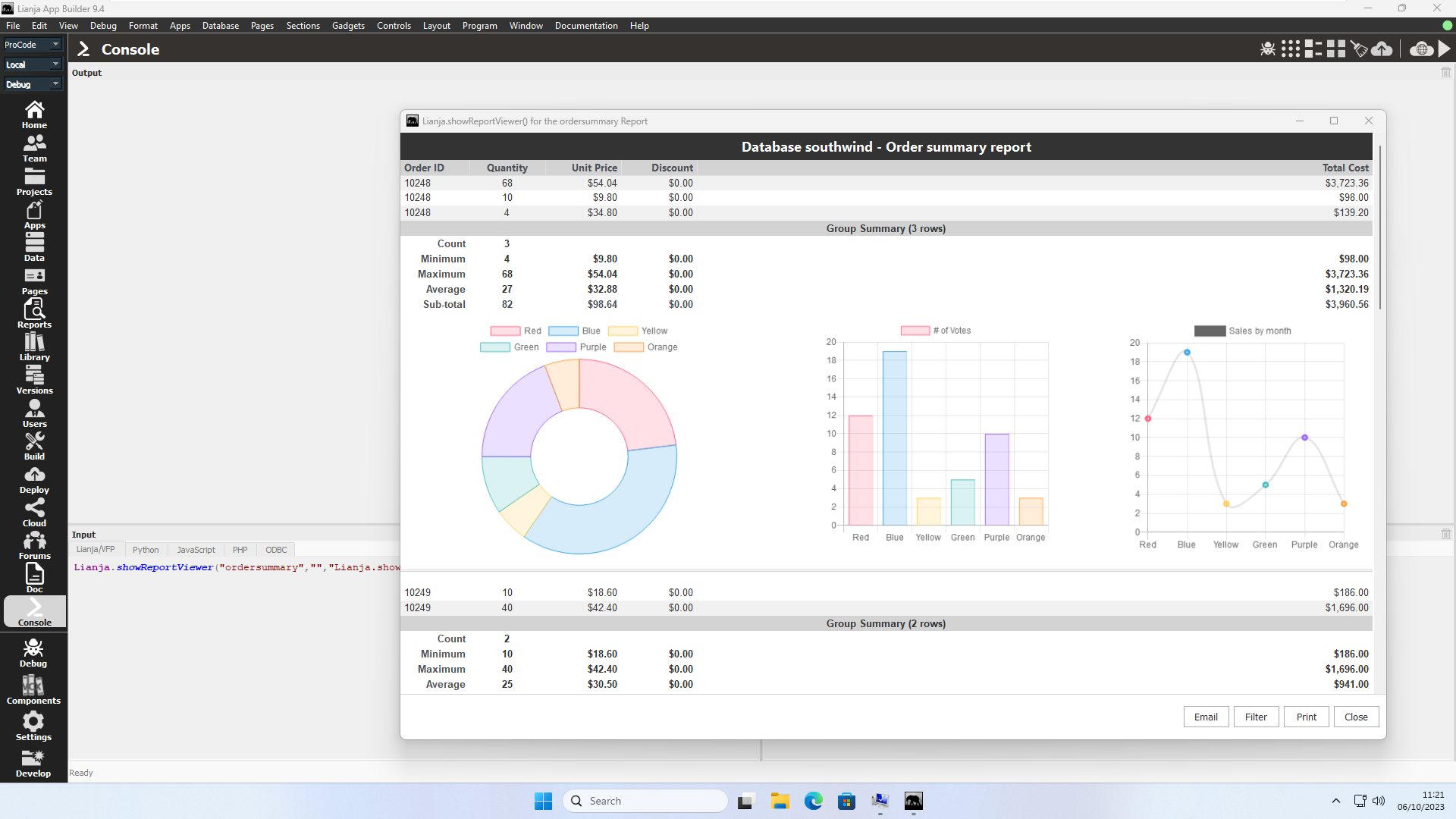
- Args
reportname as Character [, options as Character [, title as Character [, filter as Character [, canfilter as Boolean [, canemail as Boolean]]]]]
- Description
Show the specified report in the viewer.
| Argument | Description |
|---|---|
| reportname | One of the following:
|
| options | The options can include any of the properties handled by a report section as well as:
printer=printername e.g. \\sharedname\printername
orientation=landscape|portrait
papersize=letter|a4|etc.
e.g. "papersize=custom,3.00,1.00,inch@@printer=\\127.0.0.1\HP DeskJet 2600 series" |
| title | The Report Viewer window title. |
| filter | A where condition, e.g.
"orderid=10428" |
| canfilter | If true, then a 'Filter' button allows use of the Query Builder to filter the records selected. |
| canemail | If true, then an 'Email' button allows the report to be emailed as an attachment. See below for full details. |
Clicking the 'Email' button displays a form allowing you to compose an email and send the report as an attachment. All fields are required.
| Field | Description |
|---|---|
| To | The recipient identity in the format:<Full Name>email@domaine.g. "<Lianja Sales>[email protected]"Note there is no space between '>' and the email address. If the '<Full Name>' is not specified, '<Lianja Cloud User>' is used. |
| Subject | The email subject. |
| Message | The email body in plain text or HTML. |
The email is sent with the from address '<Lianja User ({username()})>[email protected]' and the reply to address '<noreply>[email protected]'.
The email can optionally be sent using Twilio SendGrid allowing the from and reply to addresses to be configured.
To do so, the following are required:
- Signup for SendGrid at sendgrid.com
- Set up the following environment variables:
| Environment Variable | Required | Value |
|---|---|---|
| SENDGRID_APIKEY | Yes | Your SendGrid API KEY. |
| SENDGRID_SENDERIDENTITY | No | Your SendGrid verified sender identity in the format:<Full Name>email@domaine.g. "<Lianja Sales>[email protected]"Note there is no space between '>' and the email address. If this environment variable is not set, the email from '<Full Name>' is '<{username()}>' and your registered SendGrid email address. |
| SENDGRID_REPLYTO | No | The reply to address for emails. If this environment variable is not set, '[email protected]' is used. |
| SENDGRID_REPLYTONAME | No | The '<Full Name>' for the reply to address for emails. |
Filter
Clicking the 'Filter' button allows use of the Query Builder to filter the records selected.
Clicking the 'Print' opens the report in the system default PDF viewer allowing the report to be printed.
showSuccessMessage
| Desktop | Web | Mobile |
- Args
message as Character [, minimumwidth as Numeric | webtitle as Character]
- Description
Show the specified message. The minimumwidth is supported on the desktop in Lianja/VFP. If specified, the message stays visible until Lianja.hideMessage() is called. If minimumwidth is > 1 this is the minimum width of the displayed message. If it is = 1, the message is displayed top right; if < 1, centred. The webtitle is supported in web/mobile and if specified, is displayed as the title of the message box.
showSuccessMessageWithIcon
| Desktop | Web | Mobile |
- Args
message as Character [, notimeout as Boolean | timeoutinverval as Numeric]
- Description
Show the specified message. If notimeout is true, the user must click/touch to hide the message. If notimeout is false (default), the message will be hidden after 5000 milliseconds. Alternatively, timoutinterval can be specfied in milliseconds to hide the message after that interval.
showWarningMessage
| Desktop | Web | Mobile |
- Args
message as Character
- Description
Show the specified message.
showWarningMessageWithIcon
| Desktop | Web | Mobile |
- Args
message as Character [, notimeout as Boolean | timeoutinverval as Numeric]
- Description
Show the specified message. If notimeout is true, the user must click/touch to hide the message. If notimeout is false (default), the message will be hidden after 5000 milliseconds. Alternatively, timoutinterval can be specfied in milliseconds to hide the message after that interval.
spawn
| Desktop | Web | Mobile |
- Args
executable as Character [, args as Character]
- Description
Run the specified executable passing the optionally specified comma-separated list of arguments.
spawnApp
| Desktop | Web | Mobile |
- Args
app as Character
- Description
Run the specified App.
sqlExec
| Desktop | Web | Mobile |
- Args
SQL statement as Character
- Description
Execute the specified SQL statement.
If the SQL statement is a SQL SELECT, the method returns an array of record objects that can be processed using FOREACH.
For other SQL statements: SQL INSERT, SQL UPDATE, SQL DELETE etc., the method returns the number of rows affected.
db = Lianja.connect('database-name')
csr = db.cursor()
arrayofobjects = csr.execute(cSqlSelectStatement)
rowsaffected = csr.execute(cSqlNonSelectStatement)
From v11.0.
startHttpServer
| Desktop | Web | Mobile |
- Args
[port as Numeric]
- Description
Start the internal HTTP server, optionally specifying the port number. The default port is 8002 for the App Builder and 8003 for the App Center.
stopHttpServer
| Desktop | Web | Mobile |
- Args
None
- Description
Stop the internal HTTP server.
suspend
| Desktop | Web | Mobile |
- Args
None
- Description
Suspend execution when debugging a Windows standalone App. From v9.5.
switchDatabase
| Desktop | Web | Mobile |
- Args
name as Character
- Description
Switch to the specified database at runtime. This should contain tables with the same name and structure.
See also Database Switcher.
switchLanguage
| Desktop | Web | Mobile |
- Args
code as Character
- Description
Switch to the specified language code. See Automatic Language Translation for more details.
toggleLeftSidebarVisibility
| Desktop | Web | Mobile |
- Args
None
- Description
Toggle left sidebar visibility.
| Desktop | Web | Mobile |
- Args
None
- Description
Toggle Navigation Panel visibility.
toggleRightSidebarVisibility
| Desktop | Web | Mobile |
- Args
None
- Description
Toggle right sidebar visibility.
translateText
| Desktop | Web | Mobile |
- Args
language as Character, text as Character
- Description
Return text translated to the specified language. See also Dynamic Language Translation.
unwatchFile
| Desktop | Web | Mobile |
- Args
filename as Character | directory as Character
- Description
Stop watching the specified file or directory for changes. Use the watchFile() method to watch a file/directory.
uploadFile
| Desktop | Web | Mobile |
- Args
title as Character, caption as Character, extension as Character, onsuccess as Function, onerror as Function, remotescript as Character
- Description
Display a file selection dialog popup where the user can select one or more files. The files are automatically uploaded and appended into the target table on the server. You can postfix arguments onto the remotescript name e.g.
Lianja.uploadFile("Choose a CSV file", "File", ".csv",
  onsuccess, onerror, "/upload_csvfile.rsp?import=southwind!customers");
See also Attachments Options.
uploadImageFiles
| Desktop | Web | Mobile |
- Args
controlsource as Character, [multiple as Boolean, [title as Character, [onsuccess as Function, [onerror as Function]]]]
- Description
Display a file selection dialog popup where the user can select one or more image files. The files are automatically uploaded and a new record (per image file) inserted into the target table on the server in the (blob) column as specified by the controlsource (table.column). The table must be open in the current App. If the optional multiple is true, multiple files can be selected, if false, only one file can be selected. The optional onsuccess function is passed one argument: a string containing a comma separated list of the files uploaded.
See also Attachments Options and Image Strip Options.
userDomain
| Desktop | Web | Mobile |
- Args
None
- Description
Return the domain/tenancy for the current user.
userName
| Desktop | Web | Mobile |
- Args
None
- Description
Return the username for the current user.
userRoles
| Desktop | Web | Mobile |
- Args
None
- Description
Return the roles for the current user.
version
| Desktop | Web | Mobile |
- Args
None
- Description
Return the current Lianja version (HTML formatted).
vibrate
| Desktop | Web | Mobile |
- Args
seconds as Numeric
- Description
On mobile devices, vibrate for the specified number of seconds. On web Client, sound a 'beep'.
watchFile
| Desktop | Web | Mobile |
- Args
filename as Character | directory as Character
- Description
Watch the specified file or directory for changes. There is a corresponding App delegate called filesystemwatcher which is called with one argument, the file/directory that has changed. Use the UnwatchFile() method to stop watching the file/directory.
writeDebug
| Desktop | Web | Mobile |
- Args
debugtext as Character
- Description
Write the debugtext string to the debug file.
writeError
| Desktop | Web | Mobile |
- Args
errortext as Character
- Description
Write the errortext string to the console.
writeLog
| Desktop | Web | Mobile |
- Args
logtext as Character
- Description
Write the logtext string to the log (desktop) or JavaScript Console (web/mobile).
writeOutput
| Desktop | Web | Mobile |
- Args
output as Character
- Description
Write the output string to the Output Window (desktop) or JavaScript Console (web/mobile).
